The short answer
Start a WooCommerce revenue audit with your most important buying journeys, a trustworthy measurement baseline, and representative product-to-order tests. Prioritize reproducible failures before speculative redesigns. If the store works but attracts the wrong buyers, acquisition may be the priority; if qualified customers cannot choose, pay, or receive what they ordered, fix that journey first.
Decide which business question the audit must answer
A revenue audit should produce a decision, not a long inventory of everything that could be improved. Start with a specific concern: first-time customers struggle to select a product, repeat customers cannot reorder efficiently, or paid orders require too much manual correction. Those are different investigations with different owners.
Define the period, product categories, customer groups, and fulfillment paths you will examine. Include someone who sees customer questions and someone who handles orders. Their observations can reveal where customers hesitate or where apparently successful transactions become operational problems. Treat those observations as leads to investigate, rather than proof of frequency or revenue loss.
Keep acquisition and onsite behavior separate. An increase in low-intent visits can reduce an overall conversion rate even if the buying experience has not changed. Conversely, a stable conversion rate can conceal a failure affecting one payment method or customer group. Segment only where your actual records support the comparison; do not fill missing data with an appealing explanation.
Write the audit brief in six lines
- Business concern: the decision leadership needs to make.
- Scope: the customer groups, products, devices, and fulfillment routes included.
- Evidence: the reports, support records, and test access available.
- Unknowns: gaps that prevent a confident diagnosis.
- Owners: who can approve and implement website and operational changes.
- Deliverable: a prioritized issue register and a plan to verify the first fixes.
Make the baseline credible before interpreting the funnel
Agree what sales means in this review. WooCommerce reports distinguish gross sales, net sales, and total sales; report settings, order status, and refunds can affect comparisons. Use the documented definitions in WooCommerce Analytics and record the date range and settings alongside your baseline.
Write the selected revenue definition into the audit brief. In WooCommerce Analytics, net sales removes returns and coupons from gross sales; total sales also includes tax and shipping. Refunds are recorded against the return date, so a refund in this period may relate to an earlier order. Confirm that the report has finished updating, and keep the same status filters and date basis when comparing periods. A change in reporting rules is not a change in customer behavior.
Then establish which customer actions are actually measured. A dashboard labeled checkout does not establish that every checkout path sends the same event. Compare a few observed journeys with the events and orders they create, including the consent states your site supports. Missing events are a measurement problem to resolve, not evidence that customers abandoned at that stage.
If you use Google Analytics 4, verify the ecommerce implementation rather than assuming the page tag measures the whole journey. Google's ecommerce measurement guide defines separate product, cart, checkout, purchase, and refund events. Ask the measurement owner to demonstrate the relevant events for your supported paths and check their item, value, currency, and transaction information where applicable.
Use a small set of measures tied to the concern: visits within the defined audit scope, product views, checkout starts, paid orders, cancellations, refunds, or support contacts, where available. Reconcile definitions before combining systems. Payment records, WooCommerce order records, and browser analytics describe different parts of the process and may not match one for one. Keep unavailable values marked unknown.
Follow the customer with a journey audit worksheet
Choose representative journeys rather than examining every page equally. A mobile shopper buying a configurable product may face different obstacles from a returning business customer ordering a familiar item. Include a common path and a consequential exception: a variation with limited availability, an unsupported shipping destination, or a payment failure.
For each step, record the exact URL, product or variation, device, date, customer state, and what happened. Screenshots help explain an issue, but the written reproduction steps make it actionable. Record personal information only where necessary and handle it through your established access controls.
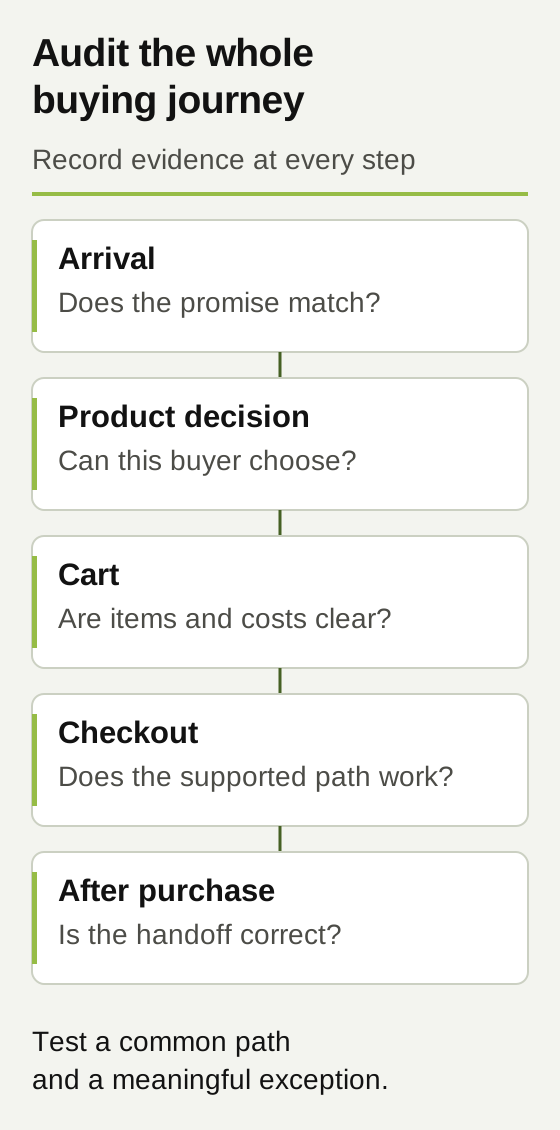
| Journey step | Question to answer | Evidence to record |
|---|---|---|
| Arrival | Does the page match the promise that brought this customer here? | Source or campaign when known, landing page, offer, and customer intent. |
| Product decision | Can the customer understand suitability, variations, availability, and the next step? | Specific missing information, unclear labels, or reproducible selection problems. |
| Cart | Are the selected items, quantities, and costs understandable? | Cart state, messages, shipping assumptions, and ability to correct a mistake. |
| Checkout | Can this customer complete the supported payment and fulfillment path? | Device, gateway test mode, address scenario, errors, and resulting order state. |
| After purchase | Do the customer and the operating team receive the right information? | Confirmation, order details, handoff, and exceptions requiring manual intervention. |
Your working worksheet
Chart one measured shopping journey
Use an ordered funnel exploration to count the same visitors progressing through product view, add to cart, checkout and purchase. Enter the measured cohort, then use the drop counts to choose the next journey to inspect.
Your entries stay in this page. This tool does not send or save them. Download your worksheet to keep a copy; reloading the page clears your entries.
Use counts from the same cohort and time period. Each stage must be a subset of the previous stage. Enter 0 for a measured zero; leave unknown counts blank.
Enter a whole count for every stage to see progression and differences between stages.
Assumptions and calculation notes
- Use one ordered cohort, identity rule, date range and attribution window. Raw event totals and independently counted page sessions are not interchangeable with these stage counts.
- Later stages must be subsets of earlier stages. Cross-device behavior, consent gaps, duplicate purchase events and missing checkout events can change the measured picture.
- A smaller stage is an observation to investigate, not proof of a design defect. This tool does not estimate recoverable revenue or imply that every exit should convert.
- Check order records, refunds and tracking quality separately. The numbers shown come only from your inputs, not a WooCommerce benchmark.
Look for missing confidence on the product page
Before changing a button color, check whether the customer has enough information to buy. Product suitability, size or compatibility, what is included, availability, and fulfillment expectations often matter more than another promotional block. The relevant questions depend on what you sell; use real sales and support questions to guide the review.
Inspect variation selection on the devices customers use. Is the chosen option obvious? Can a customer distinguish an unavailable variation from a broken selector? Does the image or description still correspond to the selection? Can someone recover from a mistake without starting again? These are testable observations, not matters of taste.
Review when customers learn about shipping limitations and other material purchase conditions. A restriction shown only after several checkout steps may create avoidable frustration. Moving accurate information earlier is a hypothesis to test, with the operational owner confirming that the wording remains correct. Do not promise delivery times or availability the business cannot support.
Test checkout through to the operational handoff
A successful button click is not the end of the test. Confirm the expected order state, payment outcome, confirmation message, and downstream handoff. Test a failed payment and a corrected address as well as the happy path. Where accounts, coupons, local pickup, subscriptions, or business pricing are part of your actual setup, include their important variations.
Plan this work in an isolated staging environment with the appropriate gateway test mode and controls for connected services. WooCommerce warns that test orders can trigger emails, enter analytics, and be treated as real orders by integrations. Its testing-orders documentation recommends staging. Agree how notifications, fulfillment, inventory changes, and QA records will be handled before testing.
Build a compact coverage matrix instead of testing randomly. One row should identify the device, customer type, product type, payment method, fulfillment route, expected result, and actual result. You do not need every possible combination to begin, but you do need to explain what was covered and which important paths remain untested.
Investigate slow responses and integration failures alongside the interface
What looks like a design problem can be a delayed response, stale information, or a failed connection. Record whether the page is slow to appear, a control is slow to respond, or an action completes without clear feedback. Those symptoms require different technical investigations. A score from one page does not establish that the full checkout journey is healthy.
Follow the data when an order is correct in WooCommerce but wrong elsewhere. Identify which system should own the affected field and where the first discrepancy appears. Duplicate records, unexpected stock changes, and missing fulfillment information belong in the audit even when the customer-facing checkout looks polished.
Keep the scope focused. The audit should establish the symptom, available evidence, responsible team, and next diagnostic step. A complex integration redesign or extensive performance project may require a separate scope. That is more useful than attaching a confident fix estimate to a problem that has not been reproduced.
Turn findings into a prioritized issue register
Separate confirmed failures from improvement hypotheses. A reproducible error preventing an eligible customer from paying deserves a different response from a belief that a shorter page might convert better. Both can be valuable work, but they should not carry the same confidence label.
Prioritize with four questions: how serious is the consequence, how often is exposure supported by evidence, how confident are we in the diagnosis, and what dependencies stand between us and a safe fix? Record effort after a responsible implementer has assessed it. Avoid multiplying guessed scores into a number that looks more precise than the evidence.
Give every finding one working status: confirmed failure, improvement hypothesis, measurement gap, or not yet tested. A status should point to a next action. A confirmed checkout failure needs correction and a repeat test; a hypothesis needs evidence; a measurement gap needs validation before a conversion conclusion. Keep the owner and next check beside the status so the audit does not end as an unassigned list.
| Finding and evidence | Priority and owner | Verification after change |
|---|---|---|
| A supported shipping choice fails in a repeatable staging checkout test. | First: development and fulfillment owner confirm the rule and correction. | Repeat the failing scenario, adjacent destinations, and order handoff. |
| Support questions suggest shoppers misunderstand product compatibility; prevalence is unknown. | Next: product owner and design team review evidence and propose clearer content. | Confirm accuracy, observe representative users, and monitor related questions. |
| The team suspects a promotional banner distracts buyers; no supporting behavior has been collected. | Investigate: measurement and design owners define a test before removal. | Use an appropriate comparison and record traffic, offer, and seasonal changes. |
A worked example: do not redesign around an untested explanation
Imagine an established parts retailer whose team believes its WooCommerce checkout needs a complete redesign. This is a hypothetical example. The audit covers mobile first-time buyers, returning account customers, and two fulfillment routes. It does not claim to represent every visitor or product.
Testing finds a reproducible shipping-rule failure for one supported product combination. Separately, support records show recurring compatibility questions, but the team has not measured their frequency. Analytics events on an alternate checkout path also need validation. These findings support three different actions: correct the confirmed failure, improve the evidence around product clarity, and repair measurement.
The business commissions those bounded changes before approving a broad redesign. Success for the first release means the previously failing order can be completed, its details reach the operating team correctly, and neighboring paths still work. Any subsequent revenue comparison must account for traffic quality, promotions, stock, and the observation period. Passing the test proves the defect was addressed; it does not by itself prove a revenue increase.
How to use the audit without overstating the result
Use the worksheets to document your store, not to score it against an invented industry average. Start with one important buying journey and one meaningful exception, retain the evidence, and expand coverage as the findings require. The worked example is hypothetical; the official sources below support reporting and test setup, not a promised revenue lift.
For a before-and-after review, write down the comparable period, included traffic and orders, tracking coverage, stock changes, promotions, and other releases. If those conditions differ materially, describe the result as an observation and explain the limits. Fixing a reproducible failure is a useful outcome even before enough commercial evidence exists to estimate its effect.
Commission an audit that leads to owned work
Ask for the completed journey worksheet, test coverage, evidence-backed issue register, unresolved questions, and an implementation sequence with named responsibilities. The first delivery should leave your team knowing what to do next and how to recognize that it worked.
At AV Social, the useful conversation spans WordPress development, customer experience, SEO, and measurement. Your product and operations owners supply the rules the website must honor. A defined project can address a bounded set of failures; an ongoing relationship makes sense when the store needs a continuing improvement queue and coordinated ownership.
If you need help identifying where your WooCommerce buying journey is breaking down, explore our WordPress services and tell us about your store. Bring the business concern, the systems involved, and the evidence you already have. We can use that to define an audit and improvement plan with a clear purpose.
Sources and further reading
Platform documentation supports the technical guidance above. The worksheets are AV Social's decision aids; their outputs use your entries and the stated assumptions.